
Elastic Rollout Scaling
Overview
Elastic Rollout Scaling allows you to dynamically adjust the number of Rollout inference engines during training without interrupting the training process. In RL training, 60–70% of time is spent on the Rollout (sample generation) phase. Elastic scaling enables flexible allocation of inference resources based on actual demand, significantly improving resource utilization and training throughput.
Use Cases
| Scenario | Description |
|---|---|
| Inference bottleneck | Rollout generation can't keep up with Actor training — scale out to accelerate sample generation |
| Resource release | Training is in late stages (e.g., response lenght has converged) — scale in to free GPUs for other tasks |
| Cross-cluster federation | Connect SGLang engines deployed in other clusters without allocating resources in the same Ray cluster |
| Elastic resource pools | Temporarily scale out using preemptible instances or idle resources; scale in when resources are reclaimed |
Prerequisites
- Training must use Fully Async mode, i.e., the
--fully-asyncflag is set - Rollout engines use SGLang as the inference backend
- Training backend uses Megatron
TIP
Elastic scaling is only available in Fully Async mode. In this mode, Rollout occupies dedicated GPU resources and runs as an independent service, making it naturally suited for elastic scaling. For more information about Fully Async mode, see Fully Async Training Pipeline.
Design Highlights
Service-Oriented API
Elastic scaling is exposed via HTTP REST APIs, fully decoupled from the training process. Users or external schedulers can trigger scaling operations through standard HTTP requests without modifying training code or restarting the training job.
Two Scale-Out Modes
| Mode | Use Case | Description |
|---|---|---|
| ray_native | Same-cluster scaling | Specify a target total engine count; Relax automatically allocates resources and launches new engines within the current Ray cluster |
| external | Cross-cluster / federation | Provide addresses of already-deployed external SGLang engines; Relax connects, syncs weights, and routes traffic to them |
Core Design Principles
- Async & non-blocking: Scaling operations execute asynchronously without blocking the training loop
- Idempotency: Repeated requests with the same parameters produce consistent results, safe to retry
- Mutual exclusion: Only one scale-out or scale-in operation can execute at a time, preventing resource contention
- Cancellation support: In-progress scale-out requests can be cancelled at any time with automatic rollback
- Graceful scale-in: Traffic is drained before removing engines — in-flight requests are allowed to complete
- Initial engine protection: Engines defined by startup parameters cannot be scaled in; only dynamically added engines can be removed
Architecture
                        ┌──────────────────────────────┐
                        │  External Scheduler / User   │
                        │   (curl / automation)        │
                        └──────────────┬───────────────┘
                                       │ HTTP REST API
                                       ▼
┌─────────────────────────────────────────────────────────────────────┐
│              Rollout Service (relax/components/rollout.py)          │
│                    Ray Serve Ingress + FastAPI                      │
│                                                                     │
│    POST /scale_out        GET /engines       POST /scale_in         │
│    GET  /scale_out/{id}                      GET  /scale_in/{id}    │
│    POST /scale_out/{id}/cancel                                      │
└──────────────────────────────┬──────────────────────────────────────┘
                               │
                               ▼
┌─────────────────────────────────────────────────────────────────────┐
│      RolloutManager (relax/distributed/ray/rollout.py)              │
│                  Ray Actor                                          │
│                                                                     │
│    scale_out()          scale_in()          get_engines_info()      │
│    ┌──────────┐         ┌──────────┐        ┌──────────────┐        │
│    │Create    │         │Select    │        │Query engine  │        │
│    │EngineGrp │         │targets   │        │status        │        │
│    │Health chk│         │Drain     │        └──────────────┘        │
│    │DCS reg   │         │Remove    │                                │
│    │Router reg│         │Cleanup   │                                │
│    └──────────┘         └──────────┘                                │
└──────────────────────────────┬──────────────────────────────────────┘
                               │
               ┌───────────────┼───────────────┐
               ▼               ▼               ▼
        ┌────────────┐  ┌────────────┐  ┌─────────────────┐
        │ SGLang     │  │ SGLang     │  │  DCS            │
        │ Router     │  │ Engine(s)  │  │  Coordinator    │
        │ (routing)  │  │ (inference)│  │  (initial eng)  │
        └────────────┘  └────────────┘  └─────────────────┘
Key Component Responsibilities:
| Component | Responsibility |
|---|---|
| Rollout Service | FastAPI layer — receives HTTP requests and forwards to RolloutManager |
| RolloutManager | Core execution layer — manages engine lifecycle, weight sync, and state machine |
| SGLang Router | Request routing layer — distributes inference requests to engines (cache-aware policy) |
| SGLang Engine | Inference engine — executes LLM generation tasks |
| DCS Coordinator | Weight distribution service — manages topology and weight broadcasts for initial engines only |
Scale-Out
State Machine
Scale-out requests go through the following state transitions:
PENDING → CREATING/CONNECTING → HEALTH_CHECKING → WEIGHT_SYNCING → READY → ACTIVE
    ↓            ↓                    ↓                ↓
CANCELLED FAILED FAILED FAILED| State | Description |
|---|---|
PENDING | Request received, waiting to be processed |
CREATING | (ray_native) Creating Ray Actors and starting SGLang engines |
CONNECTING | (external) Connecting to external engines |
HEALTH_CHECKING | Engine started/connected, running health checks |
WEIGHT_SYNCING | Health check passed, syncing latest model weights |
READY | Weight sync complete, registered with Router |
ACTIVE | Receiving and processing inference requests |
FAILED | Scale-out failed (error at any stage) |
CANCELLED | Cancelled by user |
API Reference
Initiate Scale-Out
# ray_native mode: scale to 6 engines
curl -X POST http://<rollout-host>/rollout/scale_out \
  -H "Content-Type: application/json" \
  -d '{
    "num_replicas": 6,
    "timeout_secs": 300
  }'

# external mode: connect external engines
curl -X POST http://<rollout-host>/rollout/scale_out \
  -H "Content-Type: application/json" \
  -d '{
    "engine_urls": [
      "http://192.168.1.100:30000",
      "http://198.51.100.101:30000"
    ]
  }'
Request Parameters:
| Parameter | Type | Default | Description |
|---|---|---|---|
model_name | string | "default" | Target model name |
num_replicas | int | 0 | Target total engine count (absolute). Uses ray_native mode when > 0 |
engine_urls | list[str] | [] | External engine URL list. Uses external mode when num_replicas=0 |
timeout_secs | float | None | Operation timeout (seconds), defaults to --scale-out-timeout |
Response Example:
{
  "request_id": "550e8400-e29b-41d4-a716-446655440000",
  "status": "PENDING",
  "message": "Scale-out request accepted"
}
Query Scale-Out Status
curl http://<rollout-host>/rollout/scale_out/550e8400-e29b-41d4-a716-446655440000Response Example:
{
  "request_id": "550e8400-e29b-41d4-a716-446655440000",
  "status": "WEIGHT_SYNCING",
  "model_name": "default",
  "num_replicas": 6,
  "engine_urls": [],
  "engine_ids": ["engine_4", "engine_5"],
  "failed_engines": [],
  "created_at": 1709827200.0,
  "updated_at": 1709827215.0,
  "error_message": null,
  "weight_version": null
}
List All Scale-Out Requests
# List all requests
curl http://<rollout-host>/rollout/scale_out

# Filter by status
curl "http://<rollout-host>/rollout/scale_out?status=PENDING"

# Filter by model name
curl "http://<rollout-host>/rollout/scale_out?model_name=default&status=ACTIVE"
Cancel a Single Scale-Out Request
curl -X POST http://<rollout-host>/rollout/scale_out/550e8400-e29b-41d4-a716-446655440000/cancelBatch Cancel Scale-Out Requests
# Preview what would be cancelled (dry-run)
curl -X POST http://<rollout-host>/rollout/scale_out_cancel \
  -H "Content-Type: application/json" \
  -d '{"dry_run": true}'

# Cancel all PENDING requests
curl -X POST http://<rollout-host>/rollout/scale_out_cancel \
  -H "Content-Type: application/json" \
  -d '{"status_filter": "PENDING"}'
Idempotency Guarantees
- ray_native mode:
num_replicasis an absolute target. If the current engine count (including in-flight creations) already meets or exceeds the target, the response returnsNOOPwith no action taken - external mode: The system automatically filters out engine URLs that are already active or being processed by in-flight requests — only new addresses are connected
Weight Synchronization
New engines must sync the latest model weights before they can receive inference requests. The system uses remote instance weight sync for scaled-out engines:
Weight Sync Flow
┌─────────────┐                    ┌─────────────┐
│ Seed Engine │                    │ New Engine  │
│   (initial) │                    │ (scaled-out)│
└──────┬──────┘                    └──────┬──────┘
       │                                  │
       │  Actor training complete, DCS sync done
       │                                  │
       │  sync_weights_for_scaled_out_engines()
       │                                  │
       │  init_weights_send_group()       │
       │─────────────────────────────────►│
       │                                  │
       │  send_weights_to_remote()        │
       │══════════════════════════════════│  NCCL Broadcast
       │         (GPU-to-GPU)             │
       │                                  │
       ▼                                  ▼
Send complete Receive completeWorkflow:
- Skip DCS registration on startup: Scaled-out engines set
skip_dcs_registration=Trueand do not register with the DCS Coordinator - Immediate Router registration: After health check passes, engines immediately register with the SGLang Router and can start receiving requests (with old weights)
- Actor triggers weight sync: After Actor's
update_weights_fully_async()completes, it callsRolloutManager.sync_weights_for_scaled_out_engines() - Weight sync: Weights are transferred directly from a seed engine (initial engine) via NCCL Broadcast
Prerequisites:
Weight sync depends on a healthy seed engine. The following conditions must be met:
| Condition | Behavior on Failure |
|---|---|
| Healthy seed engine exists | Weight sync fails, engine serves requests with old weights |
| Seed engine has valid weight_version | Weight sync fails, engine serves requests with old weights |
| Can retrieve seed engine URL | Weight sync fails, engine serves requests with old weights |
Characteristics:
- Simpler code: Avoids DCS topology management complexity
- No DCS impact: Scaled-out engines don't participate in DCS topology, so dynamic scaling doesn't affect weight sync for existing engines
- Automatic triggering: Weight sync is automatically triggered after Actor's DCS sync completes — no additional configuration needed
- Fast failure: When weight sync fails, it returns immediately; the engine remains running and can serve requests (with old weights)
Concurrency Protection:
During Direct Sync, _is_weight_updating = True is set to prevent concurrent weight update operations.
WARNING
When weight sync fails, scaled-out engines will serve requests with stale weights. If strict weight consistency is required, you can mark them as unhealthy in the Router first, then mark them healthy after sync completes.
Scale-In
State Machine
Scale-in requests go through the following state transitions:
PENDING → DRAINING → REMOVING → COMPLETED
    ↓         ↓          ↓
FAILED FAILED FAILED| State | Description |
|---|---|
PENDING | Request received, selecting engines to remove |
DRAINING | New request routing stopped, waiting for in-flight requests to complete |
REMOVING | Unregistering from DCS, shutting down processes, releasing resources |
COMPLETED | Scale-in complete, resources released |
FAILED | Scale-in failed |
API Reference
Initiate Scale-In
# Scale to target count: keep 4 engines
curl -X POST http://<rollout-host>/rollout/scale_in \
  -H "Content-Type: application/json" \
  -d '{
    "num_replicas": 4
  }'

# Remove specific engines by URL
curl -X POST http://<rollout-host>/rollout/scale_in \
  -H "Content-Type: application/json" \
  -d '{
    "engine_urls": [
      "http://192.168.1.100:30000"
    ]
  }'

# Force scale-in: skip drain wait
curl -X POST http://<rollout-host>/rollout/scale_in \
  -H "Content-Type: application/json" \
  -d '{
    "num_replicas": 4,
    "force": true
  }'

# Preview scale-in (dry-run)
curl -X POST http://<rollout-host>/rollout/scale_in \
  -H "Content-Type: application/json" \
  -d '{
    "num_replicas": 4,
    "dry_run": true
  }'
Request Parameters:
| Parameter | Type | Default | Description |
|---|---|---|---|
model_name | string | "default" | Target model name |
num_replicas | int | 0 | Target remaining engine count (absolute). Takes priority when > 0 |
engine_urls | list[str] | [] | Engine URLs to remove |
force | bool | false | Force removal without waiting for drain |
timeout_secs | float | None | Operation timeout (seconds) |
dry_run | bool | false | Preview only — don't actually remove engines |
Response Example:
{
  "request_id": "660e8400-e29b-41d4-a716-446655441111",
  "status": "PENDING",
  "message": "Scale-in request accepted"
}
Query Scale-In Status
curl http://<rollout-host>/rollout/scale_in/660e8400-e29b-41d4-a716-446655441111Scale-In Policies
Scale-in follows these principles:
- LIFO (Last In, First Out): Engines added most recently via scale-out are removed first
- Initial engine protection: Engines defined by
--rollout-num-gpusand--rollout-num-gpus-per-enginestartup parameters cannot be scaled in. Ifnum_replicasis less than the initial engine count, the request returns HTTP 400 - Graceful drain: Before removal, traffic to target engines is isolated in the Router (marked unhealthy), allowing in-flight requests to complete
- Partial success semantics: Successfully removed engines are not rolled back — only failures are reported
WARNING
Scale-in checks the weight synchronization state first. If update_weights_fully_async is currently in progress, scale-in waits for it to complete before proceeding, to prevent NCCL communication group inconsistency.
Query Engine Status
curl http://<rollout-host>/rollout/enginesResponse Example:
{
  "models": {
    "default": {
      "engines": [
        {
          "engine_id": "engine_0",
          "url": "http://198.51.100.10:30000",
          "status": "ACTIVE",
          "is_healthy": true
        },
        {
          "engine_id": "engine_1",
          "url": "http://198.51.100.11:30000",
          "status": "ACTIVE",
          "is_healthy": true
        }
      ]
    }
  },
  "total_engines": 2
}
Configuration
Scale-Out Parameters
| Parameter | Type | Default | Description |
|---|---|---|---|
--scale-out-timeout | float | 1800 | Total timeout for scale-out operations (seconds), covering engine startup, health check, weight sync, etc. |
--scale-out-partial-success-policy | string | rollback_all | Partial success policy. rollback_all: roll back all engines on any failure; keep_partial: keep successfully scaled engines |
Scale-In Parameters
| Parameter | Type | Default | Description |
|---|---|---|---|
--scale-in-drain-timeout | float | 30 | Drain timeout (seconds) — force-abort in-flight requests after this duration |
--scale-in-shutdown-timeout | float | 20 | Graceful engine shutdown timeout (seconds) — falls back to ray.kill if exceeded |
Configuration Example
ray job submit -- python3 relax/entrypoints/train.py \
    --fully-async \
    --rollout-num-gpus 4 \
    --rollout-num-gpus-per-engine 1 \
    --scale-out-timeout 600 \
    --scale-out-partial-success-policy keep_partial \
    --scale-in-drain-timeout 60 \
    --scale-in-shutdown-timeout 30 \
    ... # other training arguments
Usage Examples
Scenario 1: Scale Out to Overcome Inference Bottleneck
# 1. Check current engine status
curl http://localhost:8000/rollout/engines
# Returns: total_engines = 4

# 2. Scale out to 8 engines
curl -X POST http://localhost:8000/rollout/scale_out \
  -H "Content-Type: application/json" \
  -d '{"num_replicas": 8}'
# Returns: request_id = "abc-123", status = "PENDING"

# 3. Poll scale-out status
curl http://localhost:8000/rollout/scale_out/abc-123
# State transitions: PENDING → CREATING → HEALTH_CHECKING → WEIGHT_SYNCING → READY

# 4. Confirm scale-out completed
curl http://localhost:8000/rollout/engines
# Returns: total_engines = 8
Scenario 2: Connect Cross-Cluster Engines
# Launch SGLang engines on another cluster (ensure matching model path and config)
# python -m sglang.launch_server --model-path /path/to/model --port 30000

# Connect external engines
curl -X POST http://localhost:8000/rollout/scale_out \
  -H "Content-Type: application/json" \
  -d '{
    "engine_urls": [
      "http://192.0.2.50:30000",
      "http://192.0.2.51:30000"
    ]
  }'
Scenario 3: Scale In to Release Resources
# 1. Preview which engines would be removed
curl -X POST http://localhost:8000/rollout/scale_in \
  -H "Content-Type: application/json" \
  -d '{"num_replicas": 4, "dry_run": true}'

# 2. Execute scale-in after confirmation
curl -X POST http://localhost:8000/rollout/scale_in \
  -H "Content-Type: application/json" \
  -d '{"num_replicas": 4}'

# 3. Query scale-in status
curl http://localhost:8000/rollout/scale_in/<request_id>
Error Handling
Common HTTP Status Codes
| HTTP Status | Meaning | Action |
|---|---|---|
200 | Operation succeeded | - |
400 | Invalid request parameters (e.g., scale-in target below initial engine count) | Check request parameters |
404 | Request ID not found | Verify the request ID |
409 | Another scaling operation is in progress | Wait for current operation to complete, or cancel and retry |
500 | Internal error | Check training logs for details |
Scale-Out Failure Handling
- Default uses
rollback_allpolicy: if any engine fails, all created engines are rolled back and released - Switch to
--scale-out-partial-success-policy keep_partialto keep successfully created engines
Scale-In Failure Handling
- Scale-in uses partial success semantics: successfully removed engines are not rolled back
- On partial failure, the status returns
COMPLETEDwith an error message — users can retry for the failed portion
Mutual Exclusion & Safety
| Constraint | Description |
|---|---|
| Scale operation mutex | Only one scale-out or scale-in operation can execute at a time; concurrent requests return HTTP 409 |
| Weight sync mutex | Scale-in checks weight sync state before draining; waits for in-progress weight updates to complete |
| Health monitoring integration | Scaled-in engines are marked as "intentionally removed" and won't be auto-recovered by the health check system |
| Weight sync | Scaled-out engines use Remote Instance Sync for weight synchronization, not participating in DCS topology management |
Autoscaler: Automatic Scaling
WARNING
The current Autoscaler only invokes the ray_native interface for scaling operations. It must be used together with Ray's Autoscaling and cluster elasticity capabilities. For K8s-based scaling, see K8s HPA + KEDA Elastic Scaling Integration.
The Autoscaler service provides fully automatic scaling of Rollout engines based on real-time metrics collection. It eliminates the need for manual intervention by continuously monitoring engine performance and triggering scale-out/scale-in operations through configurable policies.
Architecture
┌─────────────────────────────────────────────────────────────┐
│                    AutoscalerService                        │
│                    (Ray Serve Deployment)                   │
├─────────────────────────────────────────────────────────────┤
│                                                             │
│  ┌──────────────┐   ┌──────────────┐   ┌──────────────┐     │
│  │   Metrics    │→  │   Scaling    │→  │   State      │     │
│  │   Collector  │   │   Decision   │   │   Manager    │     │
│  └──────────────┘   └──────────────┘   └──────────────┘     │
│         │                  │                  │             │
│         ▼                  ▼                  ▼             │
│  ┌──────────────────────────────────────────────────────┐   │
│  │                    State Store                       │   │
│  │  - engine_metrics_history (sliding window)           │   │
│  │  - last_scale_event_time                             │   │
│  │  - pending_scale_requests                            │   │
│  └──────────────────────────────────────────────────────┘   │
│                                                             │
└─────────────────────────────────────────────────────────────┘
         │                                         │
         │ HTTP GET /metrics                       │ HTTP POST /scale_out
         │ (per engine)                            │ /scale_in
         ▼                                         ▼
┌─────────────────┐                     ┌─────────────────────┐
│  SGLang Engine  │  ...                │   Rollout Service   │
│  (TP=2)         │                     │   (scaling API)     │
└─────────────────┘                     └─────────────────────┘
Metrics Selection
The Autoscaler uses a layered metrics system for scaling decisions:
Primary Scaling Metrics
| Metric | Type | Description | Scale-Out Trigger | Scale-In Trigger |
|---|---|---|---|---|
sglang:token_usage | gauge | KV Cache utilization ratio (0.0 - 1.0) | > 0.85 | < 0.3 |
sglang:num_queue_reqs | gauge | Number of requests waiting in queue | > N × engines | = 0 (sustained) |
sglang:queue_time_seconds | histogram | Queue waiting time (P95) | > 5.0s | - |
Auxiliary Validation Metrics
| Metric | Type | Purpose |
|---|---|---|
sglang:gen_throughput | gauge | Generation throughput (tok/s) |
sglang:time_to_first_token_seconds | histogram | TTFT P95/P99 (service quality) |
sglang:inter_token_latency_seconds | histogram | Decode latency (resource health) |
sglang:num_running_reqs | gauge | Concurrent requests |
Resource Constraint Metrics
| Metric | Type | Purpose |
|---|---|---|
sglang:max_total_num_tokens | gauge | Max tokens per engine capacity |
sglang:num_used_tokens | gauge | Currently used tokens |
Scaling Policies
Scale-Out Policy
Scale-out is triggered when ANY of the following conditions is met:
| Condition | Threshold | Duration |
|---|---|---|
token_usage_high | > 0.85 | 30s |
queue_backlog | > 10 per engine | 20s |
queue_latency_high | P95 > 5.0s | 15s |
ttft_high | P95 > 10.0s | 15s |
Delta Calculation:
# Based on token usage pressure
if token_usage > 0.9:
    usage_delta = int((token_usage - 0.7) / 0.1)  # +1 engine per 10% excess
else:
    usage_delta = 0

# Based on queue backlog
queue_delta = max(0, (queue_depth - engines * 5) // 20)

# Take larger value, capped at max_scale_out_delta
delta = min(max(usage_delta, queue_delta, 1), 4)
Scale-In Policy
Scale-in is triggered only when ALL conditions are met:
| Condition | Threshold | Duration |
|---|---|---|
token_usage_low | < 0.3 | 120s |
no_queue | = 0 | 120s |
throughput_stable | variance < 0.1 | 60s |
Conservative Approach:
- Maximum 1 engine removed per scale-in operation
- Projected usage after removal must remain < 50%
- Initial engines (defined at startup) are protected from scale-in
Cooldown & Anti-Thrashing
| Setting | Default | Description |
|---|---|---|
scale_out_cooldown_secs | 60s | Wait after scale-out before next operation |
scale_in_cooldown_secs | 300s | Wait after scale-in before next operation |
condition_window_secs | 60s | Time window for condition history |
Configuration
Enable Autoscaler
Autoscaler is enabled by providing a YAML configuration file via the --autoscaler-config parameter. If this parameter is not provided, autoscaler is disabled.
ray job submit -- python3 relax/entrypoints/train.py \
    --fully-async \
    --autoscaler-config relax/utils/autoscaler/autoscaler.yaml \
    ... # other training arguments
Configuration File Format
Create a YAML configuration file with the following structure:
# relax/utils/autoscaler/autoscaler.yaml

# Whether autoscaler is enabled (set to true when using this config file)
enabled: true

# Engine bounds
min_engines: 1
max_engines: 32

# Cooldown periods (seconds)
scale_out_cooldown_secs: 60.0
scale_in_cooldown_secs: 300.0

# Timing intervals (seconds)
metrics_interval_secs: 10.0
evaluation_interval_secs: 30.0
condition_window_secs: 60.0

# Service endpoint (will be overridden by rollout_service_url from args)
rollout_service_url: "http://localhost:8000/rollout"

# Scale-out policy: triggers when ANY condition is met
scale_out_policy:
  token_usage_threshold: 0.85
  queue_depth_per_engine: 10
  queue_time_p95_threshold: 5.0
  ttft_p95_threshold: 10.0
  condition_duration_secs: 30.0
  max_delta: 4

# Scale-in policy: triggers when ALL conditions are met
scale_in_policy:
  token_usage_threshold: 0.3
  queue_depth_threshold: 0
  throughput_variance_threshold: 0.1
  condition_duration_secs: 120.0
  max_delta: 1
  projected_usage_max: 0.5
Configuration Fields
| Field | Type | Default | Description |
|---|---|---|---|
enabled | bool | true | Whether autoscaler is enabled |
min_engines | int | 1 | Minimum number of engines |
max_engines | int | 32 | Maximum number of engines |
scale_out_cooldown_secs | float | 60.0 | Cooldown after scale-out (seconds) |
scale_in_cooldown_secs | float | 300.0 | Cooldown after scale-in (seconds) |
metrics_interval_secs | float | 10.0 | Metrics collection interval (seconds) |
evaluation_interval_secs | float | 30.0 | Scaling evaluation interval (seconds) |
condition_window_secs | float | 60.0 | Time window for condition history |
Scale-Out Policy Fields:
| Field | Type | Default | Description |
|---|---|---|---|
token_usage_threshold | float | 0.85 | Token usage threshold for scale-out |
queue_depth_per_engine | int | 10 | Queue depth per engine for scale-out |
queue_time_p95_threshold | float | 5.0 | P95 queue time threshold (seconds) |
ttft_p95_threshold | float | 10.0 | P95 TTFT threshold (seconds) |
condition_duration_secs | float | 30.0 | Duration conditions must persist |
max_delta | int | 4 | Max engines to add per scale-out |
Scale-In Policy Fields:
| Field | Type | Default | Description |
|---|---|---|---|
token_usage_threshold | float | 0.3 | Token usage threshold for scale-in |
queue_depth_threshold | int | 0 | Queue depth threshold for scale-in |
throughput_variance_threshold | float | 0.1 | Max throughput variance for stability |
condition_duration_secs | float | 120.0 | Duration all conditions must persist |
max_delta | int | 1 | Max engines to remove per scale-in |
projected_usage_max | float | 0.5 | Max projected usage after scale-in |
API Reference
Get Autoscaler Status
curl http://localhost:8000/autoscaler/statusResponse:
{
  "enabled": true,
  "running": true,
  "current_engines": 4,
  "min_engines": 2,
  "max_engines": 16,
  "last_scale_time": 1709827200.0,
  "last_scale_action": "scale_out",
  "last_decision": {
    "action": "scale_out",
    "delta": 2,
    "reason": "Conditions met: token_usage_high, queue_backlog"
  },
  "pending_requests": [],
  "recent_metrics": {
    "num_engines": 4,
    "avg_token_usage": 0.92,
    "total_queue_reqs": 45
  }
}
Enable/Disable Autoscaler
# Enable
curl -X POST http://localhost:8000/autoscaler/enable \
  -H "Content-Type: application/json" \
  -d '{"enabled": true}'

# Disable
curl -X POST http://localhost:8000/autoscaler/enable \
  -H "Content-Type: application/json" \
  -d '{"enabled": false}'
Get Condition Status
curl http://localhost:8000/autoscaler/conditionsResponse:
{
  "conditions": {
    "token_usage_high": {"type": "scale_out", "triggered": true},
    "queue_backlog": {"type": "scale_out", "triggered": false},
    "token_usage_low": {"type": "scale_in", "triggered": false},
    "no_queue": {"type": "scale_in", "triggered": true}
  },
  "metrics": {
    "avg_token_usage": 0.88,
    "total_queue_reqs": 2
  }
}
Health Check
curl http://localhost:8000/autoscaler/healthGet Scale History
Query the history of all scale operations triggered by autoscaler:
# Get all history (most recent first)
curl http://localhost:8000/autoscaler/scale_history

# Limit to 10 records
curl "http://localhost:8000/autoscaler/scale_history?limit=10"

# Filter by action type
curl "http://localhost:8000/autoscaler/scale_history?action=scale_out"
curl "http://localhost:8000/autoscaler/scale_history?action=scale_in"
Response:
{
  "history": [
    {
      "request_id": "550e8400-e29b-41d4-a716-446655440000",
      "action": "scale_out",
      "status": "ACTIVE",
      "triggered_at": 1709827200.0,
      "completed_at": 1709827230.0,
      "from_engines": 4,
      "to_engines": 6,
      "delta": 2,
      "reason": "Conditions met: token_usage_high, queue_backlog",
      "triggered_conditions": ["token_usage_high", "queue_backlog"],
      "metrics_snapshot": {
        "avg_token_usage": 0.92,
        "total_queue_reqs": 45
      },
      "error_message": null
    }
  ],
  "total_count": 5,
  "action_filter": null,
  "limit": 100
}
History Record Fields:
| Field | Type | Description |
|---|---|---|
request_id | string | Unique request ID from Rollout service |
action | string | scale_out or scale_in |
status | string | Final status: ACTIVE, COMPLETED, FAILED, CANCELLED |
triggered_at | float | Timestamp when request was triggered |
completed_at | float | Timestamp when request completed |
from_engines | int | Engine count before scaling |
to_engines | int | Engine count after scaling |
delta | int | Number of engines added/removed |
reason | string | Human-readable reason for scaling |
triggered_conditions | list | Conditions that triggered this scaling |
metrics_snapshot | dict | Metrics at decision time |
error_message | string | Error message if failed |
Usage Example
# 1. Create a custom autoscaler config file
cat > my_autoscaler.yaml << 'EOF'
enabled: true
min_engines: 2
max_engines: 8
scale_out_policy:
  token_usage_threshold: 0.80
  max_delta: 2
scale_in_policy:
  token_usage_threshold: 0.25
EOF

# 2. Start training with autoscaler enabled
ray job submit -- python3 relax/entrypoints/train.py \
    --fully-async \
    --autoscaler-config my_autoscaler.yaml

# 3. Monitor autoscaler status
watch -n 5 'curl -s http://localhost:8000/autoscaler/status | jq'

# 4. Check condition triggers
curl http://localhost:8000/autoscaler/conditions

# 5. Temporarily disable autoscaler
curl -X POST http://localhost:8000/autoscaler/enable \
  -H "Content-Type: application/json" \
  -d '{"enabled": false}'
Monitoring Dashboard
Use the built-in TUI monitor for real-time autoscaler metrics:
python -m relax.utils.autoscaler.monitor --url http://localhost:8000/autoscaler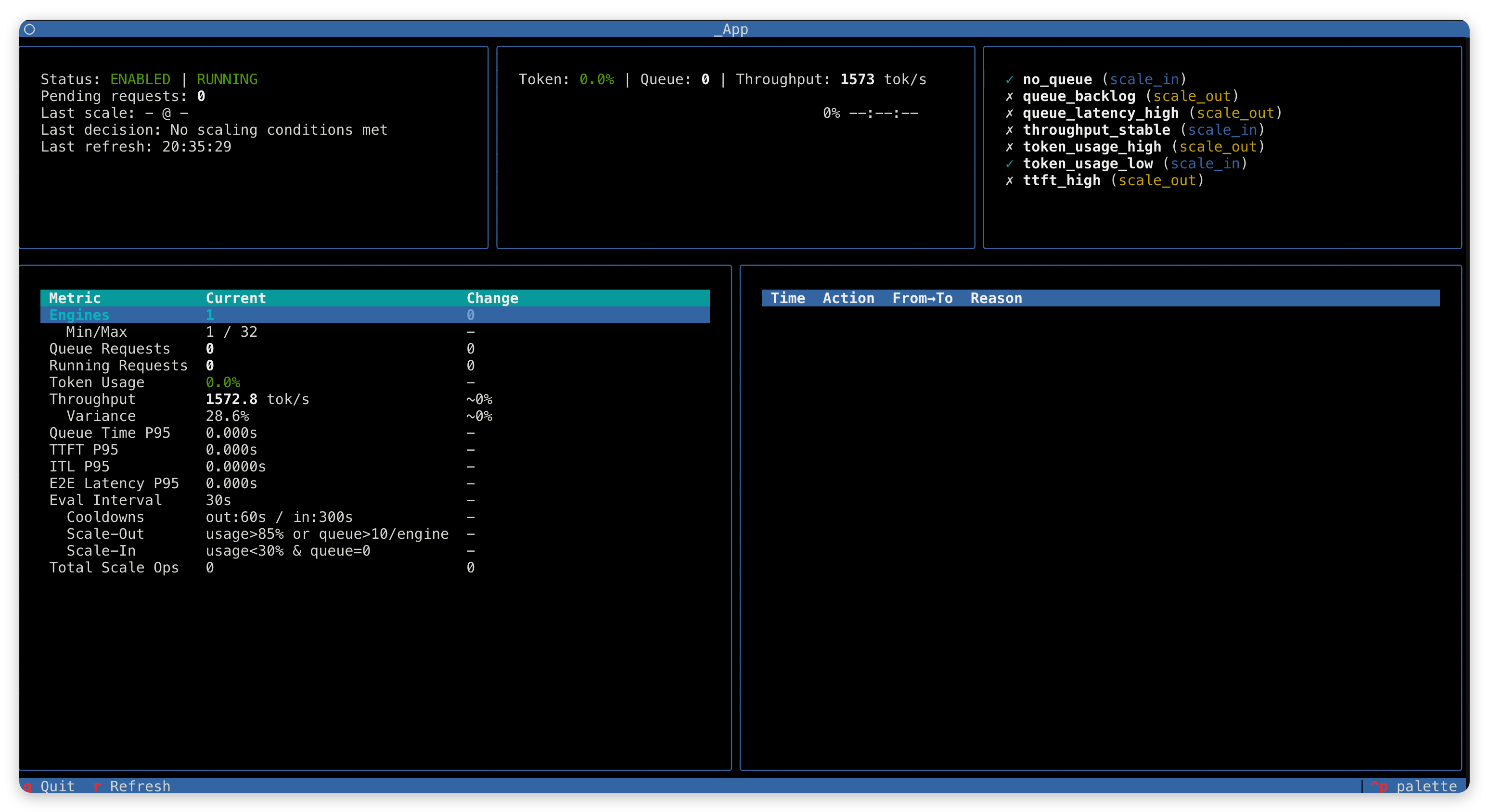
Keyboard controls: q to quit, r to force refresh.
Key Design Principles
| Principle | Description |
|---|---|
| Multi-condition logic | Scale-out: ANY condition triggers; Scale-in: ALL conditions must be met |
| Duration window | Conditions must persist for configured duration before triggering |
| Cooldown protection | Prevents rapid consecutive scaling operations |
| Conservative scale-in | Max 1 engine removed per operation, with projected usage check |
| Pending request check | No new scaling if previous operation still in progress |
| Hard bounds | min_engines and max_engines are strictly enforced |
Further Reading
- Fully Async Training Pipeline — The foundational mode for elastic scaling
- Architecture — Relax overall architecture design
- Distributed Checkpoint — DCS weight synchronization mechanism
- Health Check Manager — Health monitoring and fault recovery