
Rollout Result Viewer
A lightweight web UI for browsing the per-step JSONL files that Relax writes during training and evaluation rollouts.
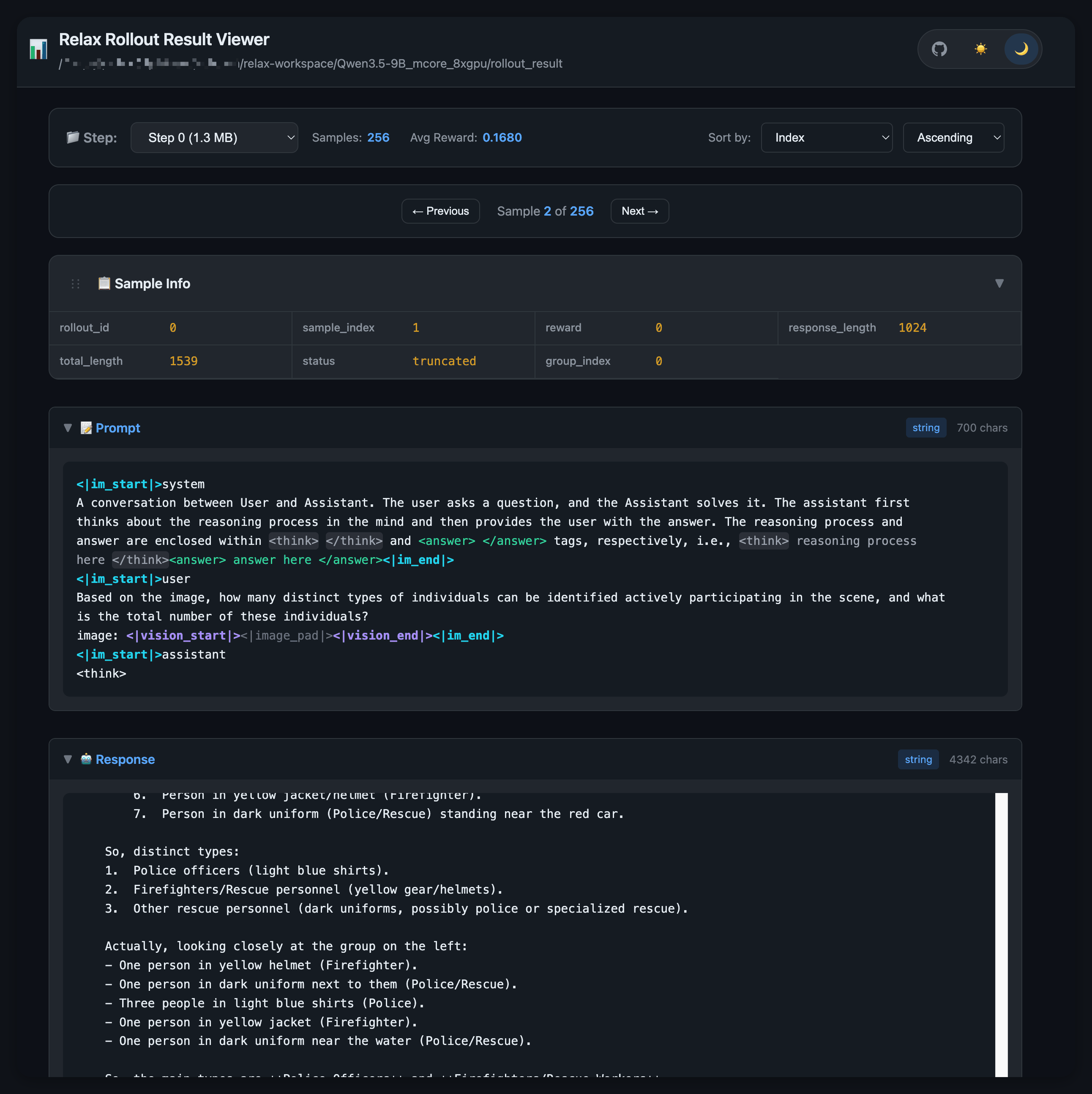
What it shows
Relax always writes a compact per-rollout summary as long as --save is set:
| Subdir | Source | Written by |
|---|---|---|
<save>/rollout_result/train/{rollout_id}.jsonl | training rollouts | save_rollout_result_jsonl |
<save>/rollout_result/eval/{rollout_id}.jsonl | eval rollouts | save_eval_summary_jsonl |
Each line is one sample: prompt, response, reward, response_length, total_length, status, group_index, and (for eval) dataset. Multimodal inputs are summarized rather than dumped.
Launch
python -m relax.entrypoints.visualize <save>/rollout_result --port 8080
# Then open http://localhost:8080
The data directory is a required positional argument. python -m relax.utils.visualize ... works too and takes the exact same arguments — the entrypoint is just a thin wrapper kept next to train.py for consistency with other Relax entrypoints.
The server auto-discovers train/ and eval/ under the data dir. If both exist, a [ train | eval ] toggle appears at the top of the page. If neither exists, the data dir itself is treated as a flat bucket — you can also point it directly at a folder of {step}.jsonl files.
Common flags
| Flag | Default | Purpose |
|---|---|---|
DATA_DIR (positional) | required | The directory to serve. |
--port | 8080 | HTTP port. |
--host | 0.0.0.0 | Bind address. |
--cache-memory | 4096 (MB) | Total RAM the in-process LRU may use. Bump it if individual train/*.jsonl files are large. |
--cache-entries | 20 | Max number of files held in cache. |
--base-path | "" | URL prefix when serving behind a reverse proxy, e.g. --base-path /absproxy/8080. |
What the page does
- Step dropdown — every
{step}.jsonlin the active subdir, sorted by step number. - Sample navigation —
← Previous/Next →, plus arrow-key shortcuts and a floating mini-nav in the bottom-right corner. - Sample Info card — scalar fields (
rollout_id,sample_index,reward,response_length,total_length,status,group_index,dataset). - Prompt / Response / Label sections — pretty-printed with chat-template, tool-call and
<think>highlighting. Long text scrolls in place; default scroll position is the end so you can see what the model just produced. - Sort controls — re-order samples within a step by
sample_index,reward, orresponse_length(ascending/descending). - Cache controls —
GET /api/cache/stats,POST /api/cache/clear.
Terminal UI (--tui)
For SSH sessions where opening a browser is inconvenient, the same command can render a textual-based terminal viewer:
python -m relax.entrypoints.visualize <save>/rollout_result --tuiRequires the optional packages textual and rich (pip install textual rich). Not in requirements.txt — web users have zero extra dependencies.
| Flag | Default | Purpose |
|---|---|---|
--tui | off | Use the terminal viewer instead of the web viewer. |
--mask-str | regex for <|image_pad|>, <|imgpad|>, <|audio_comp_pad|> | Substrings replaced with * to keep multimodal prompts readable. Pass --mask-str "" to disable. |
The TUI loads {step}.jsonl files from a single flat directory. When the data dir contains both train/ and eval/, the TUI defaults to train/; point --data-dir at <save>/rollout_result/eval to inspect eval instead.
Key bindings
| Keys | Action |
|---|---|
n / p | Next / previous sample |
N / P | Next / previous step |
f then type, enter | Find; enter again to jump to next match |
esc | Clear search |
s | Switch between plain-text and table rendering |
r | Refresh current view |
j / k | Page down / up |
h / l | Page left / right |
g / G | Top / bottom |
tab / ← / → | Move focus between widgets |
The left sidebar has dropdowns for step, sample, dataset (when eval data is loaded), and sort mode (reward asc/desc, response_length asc/desc), plus a per-field show/hide list.
Operational notes
- Intended for local or trusted-internal-network use. CORS is wide open and there is no authentication — same posture as the rest of the dump-inspection tooling.
- The server caches parsed JSONL files in process memory. For very large train dumps, raise
--cache-memoryor restart the process to free RAM. - The viewer trusts on-disk JSON; malformed lines are skipped with a warning.