
弹性 Rollout 扩缩容
概述
弹性 Rollout 扩缩容(Elastic Rollout Scaling) 允许用户在训练运行时动态调整 Rollout 推理引擎的数量,无需中断训练流程。在 RL 训练中,60~70% 的时间消耗在 Rollout(样本生成)阶段,弹性扩缩容可以根据实际需求灵活增减推理资源,显著提升资源利用效率和训练吞吐量。
适用场景
| 场景 | 说明 |
|---|---|
| 训练瓶颈在推理 | Rollout 生成速度跟不上 Actor 训练速度,大量请求堆积,扩容 Rollout 引擎加速样本生成 |
| 集群资源释放 | 训练进入后期(如 response length 已降低并收敛),缩容释放 GPU 给其他任务 |
| 跨集群联邦推理 | 接入其他集群已部署的 SGLang 引擎,无需在同一 Ray 集群内分配资源 |
| 弹性资源池 | 利用抢占式实例或空闲资源临时扩容,资源回收时自动缩容 |
前置条件
- 训练必须使用 全异步模式(Fully Async),即启动参数中包含
--fully-async - Rollout 引擎使用 SGLang 作为推理后端
- 训练后端使用 Megatron
TIP
弹性扩缩容仅在全异步模式下可用。在全异步模式中,Rollout 独占 GPU 资源并作为独立服务运行,天然适合弹性扩缩。关于全异步模式的更多信息,请参阅 全异步训练流水线。
设计特色
服务化 API
弹性扩缩容通过 HTTP REST API 提供,与训练流程完全解耦。用户或外部调度系统可以通过标准 HTTP 请求触发扩缩容操作,无需修改训练代码或重启训练任务。
两种扩容模式
| 模式 | 适用场景 | 说明 |
|---|---|---|
| ray_native | 同集群扩容 | 指定目标引擎总数,Relax 自动在当前 Ray 集群内申请资源、启动新引擎 |
| external | 跨集群/联邦扩容 | 传入已部署的外部 SGLang 引擎地址,Relax 连接、同步权重并接入流量 |
核心设计亮点
- 异步非阻塞:扩缩容操作异步执行,不阻塞训练主循环
- 幂等性:相同参数的重复请求结果一致,安全重试无副作用
- 互斥保护:同一时刻只允许一个扩/缩容操作执行,避免资源竞争
- 取消支持:进行中的扩容请求可随时取消,自动回滚已分配的资源
- 优雅缩容:缩容时先停止流量分配,等待在途请求处理完成,再释放资源
- 初始引擎保护:由启动参数定义的初始引擎不可被缩容,只能缩容动态扩容的引擎
架构
                        ┌──────────────────────────────┐
                        │  External Scheduler / User   │
                        │   (curl / automation)        │
                        └──────────────┬───────────────┘
                                       │ HTTP REST API
                                       ▼
┌─────────────────────────────────────────────────────────────────────┐
│              Rollout Service (relax/components/rollout.py)          │
│                    Ray Serve Ingress + FastAPI                      │
│                                                                     │
│    POST /scale_out        GET /engines       POST /scale_in         │
│    GET  /scale_out/{id}                      GET  /scale_in/{id}    │
│    POST /scale_out/{id}/cancel                                      │
└──────────────────────────────┬──────────────────────────────────────┘
                               │
                               ▼
┌─────────────────────────────────────────────────────────────────────┐
│      RolloutManager (relax/distributed/ray/rollout.py)              │
│                  Ray Actor                                          │
│                                                                     │
│    scale_out()          scale_in()          get_engines_info()      │
│    ┌──────────┐         ┌──────────┐        ┌──────────────┐        │
│    │Create    │         │Select    │        │Query engine  │        │
│    │EngineGrp │         │targets   │        │status        │        │
│    │Health chk│         │Drain     │        └──────────────┘        │
│    │DCS reg   │         │Remove    │                                │
│    │Router reg│         │Cleanup   │                                │
│    └──────────┘         └──────────┘                                │
└──────────────────────────────┬──────────────────────────────────────┘
                               │
               ┌───────────────┼───────────────┐
               ▼               ▼               ▼
        ┌────────────┐  ┌────────────┐  ┌─────────────────┐
        │ SGLang     │  │ SGLang     │  │  DCS            │
        │ Router     │  │ Engine(s)  │  │  Coordinator    │
        │ (routing)  │  │ (inference)│  │  (initial eng)  │
        └────────────┘  └────────────┘  └─────────────────┘
关键组件职责:
| 组件 | 职责 |
|---|---|
| Rollout Service | FastAPI 层,接收 HTTP 请求,转发给 RolloutManager |
| RolloutManager | 核心执行层,管理引擎生命周期、权重同步、状态机 |
| SGLang Router | 请求路由层,负责将推理请求分发到各引擎(cache-aware 策略) |
| SGLang Engine | 推理引擎,执行 LLM 生成任务 |
| DCS Coordinator | 权重分发服务,仅管理初始引擎的拓扑信息和权重广播 |
扩容(Scale-Out)
状态机
扩容请求经历以下状态流转:
PENDING → CREATING/CONNECTING → HEALTH_CHECKING → WEIGHT_SYNCING → READY → ACTIVE
    ↓            ↓                    ↓                ↓
CANCELLED FAILED FAILED FAILED| 状态 | 说明 |
|---|---|
PENDING | 请求已接收,等待处理 |
CREATING | (ray_native) 正在创建 Ray Actor 和启动 SGLang 引擎 |
CONNECTING | (external) 正在连接外部引擎 |
HEALTH_CHECKING | 引擎启动/连接完成,正在健康检查 |
WEIGHT_SYNCING | 健康检查通过,正在同步最新模型权重 |
READY | 权重同步完成,已注册到 Router |
ACTIVE | 正在接收并处理推理请求 |
FAILED | 扩容失败(任意阶段出错) |
CANCELLED | 用户主动取消 |
API 参考
发起扩容
# ray_native 模式:扩容到 6 个引擎
curl -X POST http://<rollout-host>/rollout/scale_out \
  -H "Content-Type: application/json" \
  -d '{
    "num_replicas": 6,
    "timeout_secs": 300
  }'

# external 模式:接入外部引擎
curl -X POST http://<rollout-host>/rollout/scale_out \
  -H "Content-Type: application/json" \
  -d '{
    "engine_urls": [
      "http://192.168.1.100:30000",
      "http://198.51.100.101:30000"
    ]
  }'
请求参数:
| 参数 | 类型 | 默认值 | 说明 |
|---|---|---|---|
model_name | string | "default" | 目标模型名 |
num_replicas | int | 0 | 目标引擎总数(绝对值)。>0 时使用 ray_native 模式 |
engine_urls | list[str] | [] | 外部引擎地址列表。num_replicas=0 时使用 external 模式 |
timeout_secs | float | None | 操作超时时间(秒),默认使用 --scale-out-timeout |
响应示例:
{
  "request_id": "550e8400-e29b-41d4-a716-446655440000",
  "status": "PENDING",
  "message": "Scale-out request accepted"
}
查询扩容状态
curl http://<rollout-host>/rollout/scale_out/550e8400-e29b-41d4-a716-446655440000响应示例:
{
  "request_id": "550e8400-e29b-41d4-a716-446655440000",
  "status": "WEIGHT_SYNCING",
  "model_name": "default",
  "num_replicas": 6,
  "engine_urls": [],
  "engine_ids": ["engine_4", "engine_5"],
  "failed_engines": [],
  "created_at": 1709827200.0,
  "updated_at": 1709827215.0,
  "error_message": null,
  "weight_version": null
}
列出所有扩容请求
# 列出所有请求
curl http://<rollout-host>/rollout/scale_out

# 按状态过滤
curl "http://<rollout-host>/rollout/scale_out?status=PENDING"

# 按模型名过滤
curl "http://<rollout-host>/rollout/scale_out?model_name=default&status=ACTIVE"
取消单个扩容请求
curl -X POST http://<rollout-host>/rollout/scale_out/550e8400-e29b-41d4-a716-446655440000/cancel批量取消扩容请求
# 预览将要取消的请求(dry-run)
curl -X POST http://<rollout-host>/rollout/scale_out_cancel \
  -H "Content-Type: application/json" \
  -d '{"dry_run": true}'

# 取消所有 PENDING 状态的请求
curl -X POST http://<rollout-host>/rollout/scale_out_cancel \
  -H "Content-Type: application/json" \
  -d '{"status_filter": "PENDING"}'
幂等性保证
- ray_native 模式:
num_replicas是绝对目标值。如果当前引擎数(含正在创建中的)已达到或超过目标值,返回NOOP,不执行任何操作 - external 模式:系统自动过滤掉已在活跃列表或进行中请求中的引擎地址,仅接入新地址
权重同步机制
新引擎启动后必须同步最新模型权重才能接收推理请求。系统采用 remote instance weight sync 方式为 scaled-out 出来的引擎进行第一次权重同步:
权重同步流程
工作流程:
- 引擎启动时跳过 DCS 注册:Scaled-out 引擎设置
skip_dcs_registration=True,不注册到 DCS Coordinator - 引擎立即注册到 Router:健康检查通过后立即注册到 SGLang Router,可开始接收请求(使用旧权重)
- Actor 触发权重同步:在 Actor 的
update_weights_fully_async()完成后,调用RolloutManager.sync_weights_for_scaled_out_engines() - 权重同步:从 seed engine(初始引擎)通过 NCCL Broadcast 直接传输权重到 scaled-out 引擎
前提条件:
权重同步依赖健康的 seed engine,必须满足以下条件:
| 条件 | 失败时行为 |
|---|---|
| 存在健康的 seed engine | 权重同步失败,引擎使用旧权重处理请求 |
| seed engine 有有效 weight_version | 权重同步失败,引擎使用旧权重处理请求 |
| 能获取 seed engine 的 URL | 权重同步失败,引擎使用旧权重处理请求 |
特点:
- 代码简单:避免 DCS 拓扑管理的复杂性
- 不影响 DCS 稳定性:Scaled-out 引擎不参与 DCS 拓扑,动态扩缩容不影响现有引擎的权重同步
- 自动触发:权重同步在 Actor 的 DCS 同步完成后自动触发,无需额外配置
- 失败快速返回:权重同步失败时直接返回,引擎保持运行状态,可正常处理请求(使用旧权重)
并发保护:
Direct Sync 期间会设置 _is_weight_updating = True,阻止并发的权重更新操作。
WARNING
权重同步失败时,scaled-out 引擎将使用旧权重处理请求。如果对权重一致性要求严格,可以在 Router 中先标记为不健康,权重同步完成后再标记为健康。
缩容(Scale-In)
状态机
缩容请求经历以下状态流转:
PENDING → DRAINING → REMOVING → COMPLETED
    ↓         ↓          ↓
FAILED FAILED FAILED| 状态 | 说明 |
|---|---|
PENDING | 请求已接收,正在选择待移除引擎 |
DRAINING | 已停止新请求调度,等待在途请求处理完成 |
REMOVING | 正在注销 DCS、关闭进程、释放资源 |
COMPLETED | 缩容完成,资源已释放 |
FAILED | 缩容失败 |
API 参考
发起缩容
# 按目标数量缩容:保留 4 个引擎
curl -X POST http://<rollout-host>/rollout/scale_in \
  -H "Content-Type: application/json" \
  -d '{
    "num_replicas": 4
  }'

# 按地址缩容:移除指定引擎
curl -X POST http://<rollout-host>/rollout/scale_in \
  -H "Content-Type: application/json" \
  -d '{
    "engine_urls": [
      "http://192.168.1.100:30000"
    ]
  }'

# 强制缩容:跳过 drain 等待
curl -X POST http://<rollout-host>/rollout/scale_in \
  -H "Content-Type: application/json" \
  -d '{
    "num_replicas": 4,
    "force": true
  }'

# 预览缩容(dry-run)
curl -X POST http://<rollout-host>/rollout/scale_in \
  -H "Content-Type: application/json" \
  -d '{
    "num_replicas": 4,
    "dry_run": true
  }'
请求参数:
| 参数 | 类型 | 默认值 | 说明 |
|---|---|---|---|
model_name | string | "default" | 目标模型名 |
num_replicas | int | 0 | 目标剩余引擎数(绝对值)。>0 时优先使用此模式 |
engine_urls | list[str] | [] | 指定移除的引擎地址列表 |
force | bool | false | 强制缩容,跳过 drain 等待 |
timeout_secs | float | None | 操作超时时间(秒) |
dry_run | bool | false | 仅预览,不实际执行缩容 |
响应示例:
{
  "request_id": "660e8400-e29b-41d4-a716-446655441111",
  "status": "PENDING",
  "message": "Scale-in request accepted"
}
查询缩容状态
curl http://<rollout-host>/rollout/scale_in/660e8400-e29b-41d4-a716-446655441111缩容策略
缩容遵循以下原则:
- LIFO(后进先出):优先移除最近一次扩容添加的引擎
- 初始引擎保护:由
--rollout-num-gpus和--rollout-num-gpus-per-engine启动参数定义的初始引擎不可被缩容。如果num_replicas小于初始引擎数,请求返回 HTTP 400 - 优雅退出:缩容前先在 Router 中隔离流量(标记为不健康),等待在途请求完成后再释放资源
- 部分成功语义:已成功移除的引擎不会回滚,仅报告失败部分
WARNING
缩容操作会先检查权重同步状态。如果当前正在进行权重更新(update_weights_fully_async),缩容会等待同步完成后再执行,以避免 NCCL 通信组状态不一致。
查询引擎状态
curl http://<rollout-host>/rollout/engines响应示例:
{
  "models": {
    "default": {
      "engines": [
        {
          "engine_id": "engine_0",
          "url": "http://198.51.100.10:30000",
          "status": "ACTIVE",
          "is_healthy": true
        },
        {
          "engine_id": "engine_1",
          "url": "http://198.51.100.11:30000",
          "status": "ACTIVE",
          "is_healthy": true
        }
      ]
    }
  },
  "total_engines": 2
}
配置参数
扩容参数
| 参数 | 类型 | 默认值 | 说明 |
|---|---|---|---|
--scale-out-timeout | float | 1800 | 扩容操作总超时(秒),包括引擎启动、健康检查、权重同步等 |
--scale-out-partial-success-policy | string | rollback_all | 部分成功处理策略。rollback_all:任一引擎失败则全部回滚;keep_partial:保留成功的引擎 |
缩容参数
| 参数 | 类型 | 默认值 | 说明 |
|---|---|---|---|
--scale-in-drain-timeout | float | 30 | 流量排空超时(秒),超时后强制中止在途请求 |
--scale-in-shutdown-timeout | float | 20 | 引擎优雅关闭超时(秒),超时后使用 ray.kill 强制终止 |
配置示例
ray job submit -- python3 relax/entrypoints/train.py \
    --fully-async \
    --rollout-num-gpus 4 \
    --rollout-num-gpus-per-engine 1 \
    --scale-out-timeout 600 \
    --scale-out-partial-success-policy keep_partial \
    --scale-in-drain-timeout 60 \
    --scale-in-shutdown-timeout 30 \
    ... # 其他训练参数
使用示例
场景一:训练推理瓶颈,扩容 Rollout
# 1. 查看当前引擎状态
curl http://localhost:8000/rollout/engines
# 返回:total_engines = 4

# 2. 扩容到 8 个引擎
curl -X POST http://localhost:8000/rollout/scale_out \
  -H "Content-Type: application/json" \
  -d '{"num_replicas": 8}'
# 返回:request_id = "abc-123", status = "PENDING"

# 3. 轮询扩容状态
curl http://localhost:8000/rollout/scale_out/abc-123
# 状态流转:PENDING → CREATING → HEALTH_CHECKING → WEIGHT_SYNCING → READY

# 4. 确认扩容完成
curl http://localhost:8000/rollout/engines
# 返回:total_engines = 8
场景二:接入跨集群引擎
# 在另一个集群上启动 SGLang 引擎(确保模型路径和配置一致)
# python -m sglang.launch_server --model-path /path/to/model --port 30000

# 接入外部引擎
curl -X POST http://localhost:8000/rollout/scale_out \
  -H "Content-Type: application/json" \
  -d '{
    "engine_urls": [
      "http://192.0.2.50:30000",
      "http://192.0.2.51:30000"
    ]
  }'
场景三:训练后期缩容释放资源
# 1. 先预览会移除哪些引擎
curl -X POST http://localhost:8000/rollout/scale_in \
  -H "Content-Type: application/json" \
  -d '{"num_replicas": 4, "dry_run": true}'

# 2. 确认后执行缩容
curl -X POST http://localhost:8000/rollout/scale_in \
  -H "Content-Type: application/json" \
  -d '{"num_replicas": 4}'

# 3. 查询缩容状态
curl http://localhost:8000/rollout/scale_in/<request_id>
错误处理
常见错误码
| HTTP 状态码 | 含义 | 处理建议 |
|---|---|---|
200 | 操作成功 | - |
400 | 请求参数无效(如缩容目标小于初始引擎数) | 检查请求参数 |
404 | 请求 ID 不存在 | 检查请求 ID 是否正确 |
409 | 存在进行中的扩缩容操作 | 等待当前操作完成,或取消后重试 |
500 | 内部错误 | 查看训练日志排查 |
扩容失败处理
- 默认使用
rollback_all策略:任一引擎扩容失败时,已创建的引擎全部回滚释放 - 可通过
--scale-out-partial-success-policy keep_partial切换为保留成功的引擎
缩容失败处理
- 缩容采用 部分成功 语义:已成功移除的引擎不会回滚
- 部分失败时返回
COMPLETED状态并附带错误信息,用户可针对失败部分重试
互斥与安全
| 约束 | 说明 |
|---|---|
| 扩缩容互斥 | 同一时刻只允许一个扩容或缩容操作执行,并发请求返回 HTTP 409 |
| 权重同步互斥 | 缩容在 Drain 前检查权重同步状态,如正在进行权重更新则等待完成 |
| 健康监控集成 | 缩容的引擎会被标记为 "intentionally removed",不会被健康检查系统自动恢复 |
| 权重同步 | Scaled-out 引擎通过 Remote Instance Sync 同步权重,不参与 DCS 拓扑管理 |
Autoscaler 自动扩缩
注意
当前 Autoscaler 仅调用 ray_native 接口进行扩缩操作,必须结合 Ray 的 Autoscaling 以及集群弹性能力配合使用。如果要基于 K8s 搭建扩缩,建议参考 K8s HPA + KEDA 弹性扩缩容集成方案。
Autoscaler 服务提供完全自动化的 Rollout 引擎扩缩容,基于实时指标采集自动触发扩缩操作。通过可配置的策略,系统自动监控引擎性能并在需要时触发扩容或缩容,无需人工干预。
架构
┌─────────────────────────────────────────────────────────────┐
│                    AutoscalerService                        │
│                    (Ray Serve Deployment)                   │
├─────────────────────────────────────────────────────────────┤
│                                                             │
│  ┌──────────────┐   ┌──────────────┐   ┌──────────────┐     │
│  │   Metrics    │→  │   Scaling    │→  │   State      │     │
│  │   Collector  │   │   Decision   │   │   Manager    │     │
│  └──────────────┘   └──────────────┘   └──────────────┘     │
│         │                  │                  │             │
│         ▼                  ▼                  ▼             │
│  ┌──────────────────────────────────────────────────────┐   │
│  │                    State Store                       │   │
│  │  - engine_metrics_history (sliding window)           │   │
│  │  - last_scale_event_time                             │   │
│  │  - pending_scale_requests                            │   │
│  └──────────────────────────────────────────────────────┘   │
│                                                             │
└─────────────────────────────────────────────────────────────┘
         │                                         │
         │ HTTP GET /metrics                       │ HTTP POST /scale_out
         │ (per engine)                            │ /scale_in
         ▼                                         ▼
┌─────────────────┐                     ┌─────────────────────┐
│  SGLang Engine  │  ...                │   Rollout Service   │
│  (TP=2)         │                     │   (scaling API)     │
└─────────────────┘                     └─────────────────────┘
指标选择
Autoscaler 采用分层指标体系进行扩缩决策:
主扩缩指标
| 指标名 | 类型 | 描述 | 扩容触发条件 | 缩容触发条件 |
|---|---|---|---|---|
sglang:token_usage | gauge | KV Cache 利用率 (0.0 - 1.0) | > 0.85 | < 0.3 |
sglang:num_queue_reqs | gauge | 等待队列中的请求数 | > N × 引擎数 | = 0 (持续) |
sglang:queue_time_seconds | histogram | 排队等待时间 (P95) | > 5.0s | - |
辅助验证指标
| 指标名 | 类型 | 用途 |
|---|---|---|
sglang:gen_throughput | gauge | 生成吞吐量 (tok/s) |
sglang:time_to_first_token_seconds | histogram | TTFT P95/P99 (服务质量) |
sglang:inter_token_latency_seconds | histogram | 解码延迟 (资源健康度) |
sglang:num_running_reqs | gauge | 并发请求数 |
资源约束指标
| 指标名 | 类型 | 用途 |
|---|---|---|
sglang:max_total_num_tokens | gauge | 单引擎最大容量 |
sglang:num_used_tokens | gauge | 当前占用 tokens |
扩缩策略
扩容策略
满足以下任意条件即触发扩容:
| 条件 | 阈值 | 持续时长 |
|---|---|---|
token_usage_high | > 0.85 | 30s |
queue_backlog | > 10/引擎 | 20s |
queue_latency_high | P95 > 5.0s | 15s |
ttft_high | P95 > 10.0s | 15s |
扩容幅度计算:
# 基于利用率压力
if token_usage > 0.9:
    usage_delta = int((token_usage - 0.7) / 0.1)  # 每 10% 超额 +1 引擎
else:
    usage_delta = 0

# 基于队列积压
queue_delta = max(0, (queue_depth - engines * 5) // 20)

# 取较大值,限制最大扩容幅度
delta = min(max(usage_delta, queue_delta, 1), 4)
缩容策略
满足以下全部条件才触发缩容:
| 条件 | 阈值 | 持续时长 |
|---|---|---|
token_usage_low | < 0.3 | 120s |
no_queue | = 0 | 120s |
throughput_stable | 方差 < 0.1 | 60s |
保守策略:
- 单次缩容最多移除 1 个引擎
- 预测缩容后利用率仍 < 50% 才允许执行
- 初始引擎(启动参数定义)受保护,不会被缩容
冷却期与防抖动
| 设置 | 默认值 | 描述 |
|---|---|---|
scale_out_cooldown_secs | 60s | 扩容后等待时间 |
scale_in_cooldown_secs | 300s | 缩容后等待时间 |
condition_window_secs | 60s | 条件历史时间窗口 |
配置参数
启用 Autoscaler
Autoscaler 通过 --autoscaler-config 参数指定 YAML 配置文件来启用。如果不提供此参数,autoscaler 默认禁用。
ray job submit -- python3 relax/entrypoints/train.py \
    --fully-async \
    --autoscaler-config relax/utils/autoscaler/autoscaler.yaml \
    ... # 其他训练参数
配置文件格式
创建一个 YAML 配置文件,格式如下:
# relax/utils/autoscaler/autoscaler.yaml

# 是否启用 autoscaler(使用此配置文件时设置为 true)
enabled: true

# 引擎数量边界
min_engines: 1
max_engines: 32

# 冷却期(秒)
scale_out_cooldown_secs: 60.0
scale_in_cooldown_secs: 300.0

# 时间间隔(秒)
metrics_interval_secs: 10.0
evaluation_interval_secs: 30.0
condition_window_secs: 60.0

# 服务端点(会被命令行参数 rollout_service_url 覆盖)
rollout_service_url: "http://localhost:8000/rollout"

# 扩容策略:满足任意条件即触发
scale_out_policy:
  token_usage_threshold: 0.85
  queue_depth_per_engine: 10
  queue_time_p95_threshold: 5.0
  ttft_p95_threshold: 10.0
  condition_duration_secs: 30.0
  max_delta: 4

# 缩容策略:满足全部条件才触发
scale_in_policy:
  token_usage_threshold: 0.3
  queue_depth_threshold: 0
  throughput_variance_threshold: 0.1
  condition_duration_secs: 120.0
  max_delta: 1
  projected_usage_max: 0.5
配置字段说明
| 字段 | 类型 | 默认值 | 描述 |
|---|---|---|---|
enabled | bool | true | 是否启用 autoscaler |
min_engines | int | 1 | 最小引擎数 |
max_engines | int | 32 | 最大引擎数 |
scale_out_cooldown_secs | float | 60.0 | 扩容冷却期(秒) |
scale_in_cooldown_secs | float | 300.0 | 缩容冷却期(秒) |
metrics_interval_secs | float | 10.0 | 指标采集间隔(秒) |
evaluation_interval_secs | float | 30.0 | 扩缩评估间隔(秒) |
condition_window_secs | float | 60.0 | 条件历史时间窗口 |
扩容策略字段:
| 字段 | 类型 | 默认值 | 描述 |
|---|---|---|---|
token_usage_threshold | float | 0.85 | 扩容 token 使用率阈值 |
queue_depth_per_engine | int | 10 | 每引擎队列深度阈值 |
queue_time_p95_threshold | float | 5.0 | P95 排队时间阈值(秒) |
ttft_p95_threshold | float | 10.0 | P95 TTFT 阈值(秒) |
condition_duration_secs | float | 30.0 | 条件持续时长 |
max_delta | int | 4 | 单次最大扩容引擎数 |
缩容策略字段:
| 字段 | 类型 | 默认值 | 描述 |
|---|---|---|---|
token_usage_threshold | float | 0.3 | 缩容 token 使用率阈值 |
queue_depth_threshold | int | 0 | 队列深度阈值 |
throughput_variance_threshold | float | 0.1 | 最大吞吐量方差 |
condition_duration_secs | float | 120.0 | 条件持续时长 |
max_delta | int | 1 | 单次最大缩容引擎数 |
projected_usage_max | float | 0.5 | 缩容后预测利用率上限 |
API 参考
获取 Autoscaler 状态
curl http://localhost:8000/autoscaler/status响应示例:
{
  "enabled": true,
  "running": true,
  "current_engines": 4,
  "min_engines": 2,
  "max_engines": 16,
  "last_scale_time": 1709827200.0,
  "last_scale_action": "scale_out",
  "last_decision": {
    "action": "scale_out",
    "delta": 2,
    "reason": "Conditions met: token_usage_high, queue_backlog"
  },
  "pending_requests": [],
  "recent_metrics": {
    "num_engines": 4,
    "avg_token_usage": 0.92,
    "total_queue_reqs": 45
  }
}
启用/禁用 Autoscaler
# 启用
curl -X POST http://localhost:8000/autoscaler/enable \
  -H "Content-Type: application/json" \
  -d '{"enabled": true}'

# 禁用
curl -X POST http://localhost:8000/autoscaler/enable \
  -H "Content-Type: application/json" \
  -d '{"enabled": false}'
获取条件状态
curl http://localhost:8000/autoscaler/conditions响应示例:
{
  "conditions": {
    "token_usage_high": {"type": "scale_out", "triggered": true},
    "queue_backlog": {"type": "scale_out", "triggered": false},
    "token_usage_low": {"type": "scale_in", "triggered": false},
    "no_queue": {"type": "scale_in", "triggered": true}
  },
  "metrics": {
    "avg_token_usage": 0.88,
    "total_queue_reqs": 2
  }
}
健康检查
curl http://localhost:8000/autoscaler/health查询扩缩历史
查询 autoscaler 触发的所有扩缩操作历史:
# 获取所有历史记录(最新在前)
curl http://localhost:8000/autoscaler/scale_history

# 限制返回条数
curl "http://localhost:8000/autoscaler/scale_history?limit=10"

# 按操作类型过滤
curl "http://localhost:8000/autoscaler/scale_history?action=scale_out"
curl "http://localhost:8000/autoscaler/scale_history?action=scale_in"
响应示例:
{
  "history": [
    {
      "request_id": "550e8400-e29b-41d4-a716-446655440000",
      "action": "scale_out",
      "status": "ACTIVE",
      "triggered_at": 1709827200.0,
      "completed_at": 1709827230.0,
      "from_engines": 4,
      "to_engines": 6,
      "delta": 2,
      "reason": "Conditions met: token_usage_high, queue_backlog",
      "triggered_conditions": ["token_usage_high", "queue_backlog"],
      "metrics_snapshot": {
        "avg_token_usage": 0.92,
        "total_queue_reqs": 45
      },
      "error_message": null
    }
  ],
  "total_count": 5,
  "action_filter": null,
  "limit": 100
}
历史记录字段说明:
| 字段 | 类型 | 描述 |
|---|---|---|
request_id | string | Rollout 服务返回的唯一请求 ID |
action | string | scale_out 或 scale_in |
status | string | 最终状态:ACTIVE、COMPLETED、FAILED、CANCELLED |
triggered_at | float | 请求触发时间戳 |
completed_at | float | 请求完成时间戳 |
from_engines | int | 扩缩前引擎数 |
to_engines | int | 扩缩后引擎数 |
delta | int | 新增/移除的引擎数 |
reason | string | 扩缩原因描述 |
triggered_conditions | list | 触发此次扩缩的条件列表 |
metrics_snapshot | dict | 决策时刻的指标快照 |
error_message | string | 失败时的错误信息 |
使用示例
# 1. 创建自定义 autoscaler 配置文件
cat > my_autoscaler.yaml << 'EOF'
enabled: true
min_engines: 2
max_engines: 8
scale_out_policy:
  token_usage_threshold: 0.80
  max_delta: 2
scale_in_policy:
  token_usage_threshold: 0.25
EOF

# 2. 启动训练并启用 autoscaler
ray job submit -- python3 relax/entrypoints/train.py \
    --fully-async \
    --autoscaler-config my_autoscaler.yaml

# 3. 监控 autoscaler 状态
watch -n 5 'curl -s http://localhost:8000/autoscaler/status | jq'

# 4. 查看条件触发情况
curl http://localhost:8000/autoscaler/conditions

# 5. 临时禁用 autoscaler
curl -X POST http://localhost:8000/autoscaler/enable \
  -H "Content-Type: application/json" \
  -d '{"enabled": false}'
监控面板
使用内置 TUI 监控器实时查看 autoscaler 指标:
python -m relax.utils.autoscaler.monitor --url http://localhost:8000/autoscaler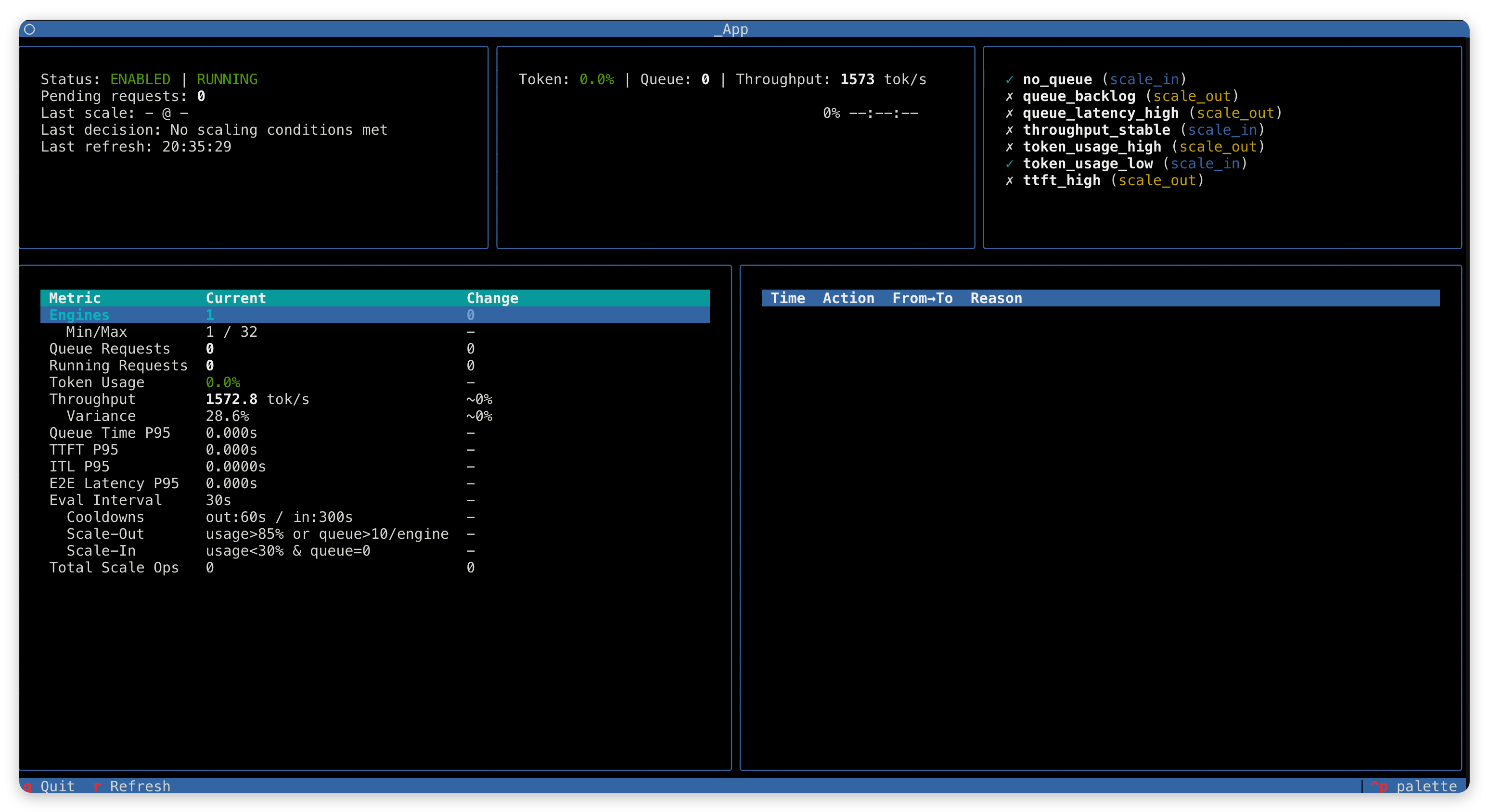
键盘控制:q 退出,r 强制刷新。
关键设计原则
| 原则 | 描述 |
|---|---|
| 多条件逻辑 | 扩容:任一条件触发;缩容:所有条件必须同时满足 |
| 持续时长窗口 | 条件必须持续指定时长才触发,避免瞬时波动 |
| 冷却期保护 | 防止短时间内连续扩缩容操作 |
| 保守缩容 | 单次最多缩 1 个引擎,且预测缩容后利用率 < 50% |
| pending 检查 | 有未完成的扩缩请求时不触发新操作 |
| 硬边界保护 | min_engines 和 max_engines 严格限制 |
延伸阅读
- 全异步训练流水线 — 弹性扩缩容的基础运行模式
- 系统架构 — Relax 整体架构设计
- 分布式 Checkpoint — DCS 权重同步机制
- 健康检查管理器 — 健康监控与故障恢复